An online business using WhatsApp runs on a simple idea: your customers are already in the WhatsApp Business app, so you meet them there. You show products in a catalog, answer questions on WhatsApp, take orders, collect payment and send updates, all from a phone. The WhatsApp Business app is free, and it needs no website, no stock room and no big budget, which is why so many small sellers begin with it.
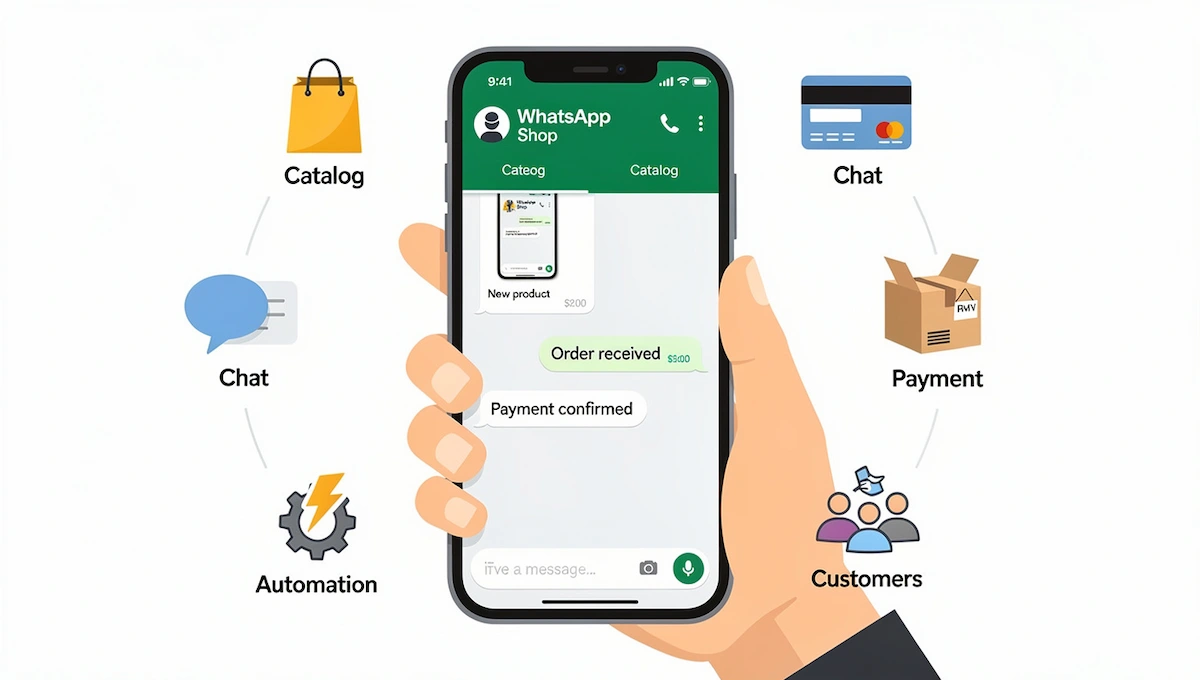
This guide shows how to start, step by step: how the WhatsApp Business app differs from the platform, how to set up your business profile and catalog, how to take payments and find the first customers, and which business ideas fit the WhatsApp Business app best. It also covers dropshipping, automation, the rules on consent, common mistakes, costs and a FAQ at the end.
Key takeaways
- You can start an online business on WhatsApp with a phone, a business number and the free WhatsApp Business app.
- The catalog, quick replies, labels and status give a small seller most of what a first shop needs.
- Most payments happen outside the chat, through bank transfer, wallets, payment links or cash on delivery.
- Get consent before you message anyone, and follow the WhatsApp business and commerce rules.
- Move to the Business Platform only when the volume grows beyond what one phone can handle.
Can you run an online business using WhatsApp?
Yes, with limits. WhatsApp was built as a messaging app, but the WhatsApp Business app adds the tools a seller needs: a business profile, a product catalog, quick replies, labels and broadcast lists. A person can sell on WhatsApp with nothing more than a phone number, a few product photos and a way to get paid.
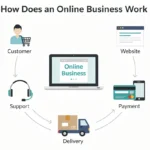
The model works best for small and local sellers, service providers and creators. A bakery can take daily orders, a tutor can book lessons, a reseller can post new stock in the status and a freelancer can send quotes on WhatsApp. Many customers prefer to ask a question and get an answer in minutes, and chat makes that easy. If you are new to the idea, how an online business works explains the basic parts every online seller needs, whatever the channel.
The limits are real too. WhatsApp has no built-in shopping checkout in most countries, orders are often handled by hand, and big volume needs extra tools. A seller who wants to grow beyond a few dozen chats a day usually adds a website or moves to the business platform later. The sections below show how to start small and grow in the right order.
Benefits of using WhatsApp for an online business
WhatsApp suits small online sellers for a few clear reasons. The first is reach: billions of people already use the app every day, so customers do not need to install anything new or create an account on a shop site. They write a message, the seller replies and the sale can close in the same conversation.
- Low cost: the WhatsApp Business app is free, and there is no need for a website, a payment gateway or a shop lease to take the first orders.
- Direct and personal contact: customers talk to a real person, which builds trust faster than a contact form or an email.
- Fast answers: chat replies come in minutes, which helps customers decide while they are interested.
- Rich media: photos, voice notes, short videos and documents are easy to send, so products can be shown and explained clearly.
- Customer support in one place: questions, orders, payment proof and delivery updates stay in the same thread.
- Feedback and surveys: a short message after delivery brings reviews and ideas for improving the product.
These advantages are the reason chat-based selling grows fast in many countries, and they are part of the wider benefits of an online business, such as low costs, flexible hours and a global customer base.
WhatsApp, WhatsApp Business app and Business Platform
There are three ways to use WhatsApp for business, and they are built for different sizes of company. The table below shows the main differences.

| Feature | WhatsApp (personal) | WhatsApp Business app | WhatsApp Business Platform (API) |
|---|---|---|---|
| Built for | Friends and family | Solo sellers and small businesses | Medium and large companies |
| Cost | Free | Free | Paid per message, through a provider |
| Setup | Phone number | Phone and business number | Provider, verification and templates |
| Business profile | No | Yes | Yes |
| Catalog | No | Yes | Yes |
| Quick replies and away messages | No | Yes | Through software |
| Chatbots and automation | No | Basic | Full |
| Several agents on one account | No | Limited | Yes |
| Best for | Chatting | Starting an online business | High message volume |
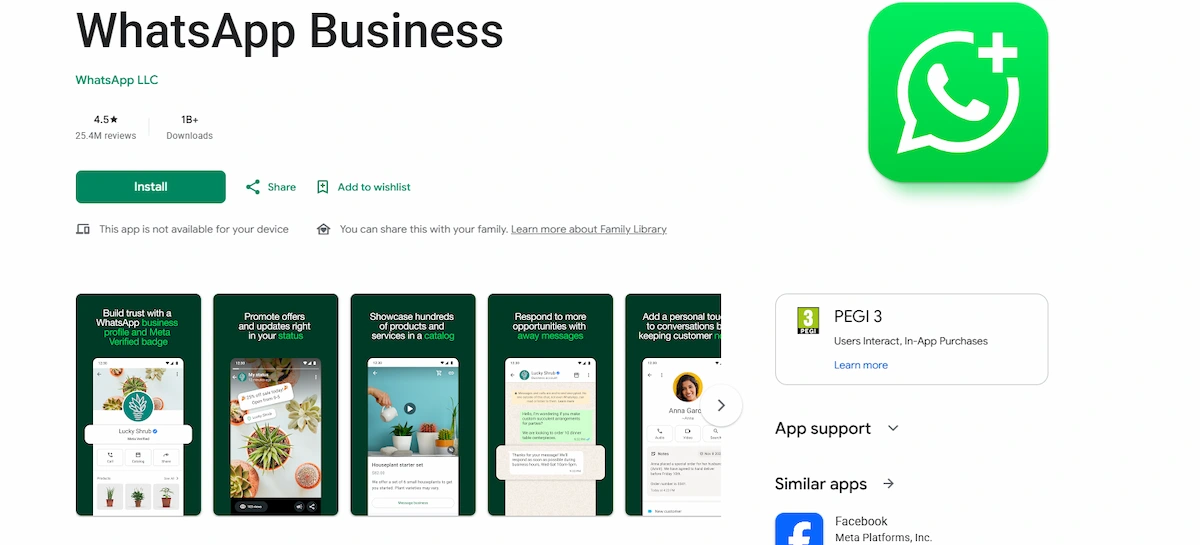
A business account on either route is called a WhatsApp Business Account, or WABA, and it holds the phone number, the display name and the business identity. The app is the right choice for almost every new seller, and you can read the official overview on the WhatsApp Business app page.
Which one should you choose?
Start with the WhatsApp Business app. It is free, it takes minutes to set up and it has everything needed for the first customers. Move to the Business Platform only when the volume grows past what one phone can handle, when several people need to answer WhatsApp chats at the same time or when you want chatbots and bulk messages.
The platform is reached through a Business Solution Provider, which is a partner company that handles verification, message templates and software connections. This route costs money, so wait until the sales justify it.
Verified business badge and official business accounts
Some businesses show a verified badge next to the name, which WhatsApp grants after a review of the company. The badge belongs mainly to larger brands and to accounts on the Business Platform. Most small sellers work without it and still sell well, because customers care more about clear prices, fast replies and good photos than about a badge.
How to start an online business on WhatsApp in 8 steps
The steps below follow the order most successful sellers use to start an online business on WhatsApp, from the idea to the first delivery.
Before you start: what you need
Prepare a few things before you install the app. You need a smartphone with a stable internet connection, a business number that is not your personal one, a business name that matches how customers will find you and a logo or a clear product photo. Have at least ten product photos with prices, a payment method and a plan for delivery. For the Business Platform you also need a Meta business account, business details and a record of customer opt-ins.
1. Choose a product or service
Pick something people already buy on WhatsApp and that you can deliver without a big upfront cost. Clothes, food, beauty products, phone accessories, handmade goods, tutoring and design work all sell well on WhatsApp. If you have no experience, the guide on starting an online business with no experience shows how to choose a safe first idea.
2. Download the WhatsApp Business app and register a business number
Install the WhatsApp Business app and register it with a number used only for the business. A separate number keeps customer WhatsApp chats apart from personal ones. The app can also run on a landline or a second SIM, and it verifies the number with a code. Never move your personal chats into the business account, because it is hard to separate them later.
3. Build your business profile
The business profile is the shop sign. Add a clear business name, a logo or product photo as the profile picture, a short description, the category, opening hours, the address if you have one and a link to your website or social page. Fill in every field, because customers use the profile to decide if the business is real and trustworthy.
4. Create a catalog and collections
The WhatsApp Business catalog works like a small online shop inside the WhatsApp Business app. Add each product with a clear photo, a name, a price, a short description and a link if the product is on a website. Group items into collections such as new arrivals or seasonal offers, so customers can browse without asking for a list. Keep prices current, because an old price in the catalog leads to arguments at checkout.
5. Set a greeting, away message and quick replies
A greeting message welcomes every new customer, an away message answers outside working hours and quick replies save short answers to common questions, such as prices, delivery time or payment details. Start with five to ten quick replies and add more when you see the same question again. These three tools make a small business look organized and keep response times short.
6. Announce your business
Tell your existing contacts first. Post the catalog link in your WhatsApp status, share it with friends and family and ask them to forward it. Join local buyer and seller groups where self-promotion is allowed, and share your link on social media. Starting with people who already know you is the fastest way to get the first orders and the first reviews.
7. Take orders and accept payments
Confirm every order in writing in the WhatsApp chat: the items, the price, the delivery cost and the delivery date. Then send the payment details or a payment link and wait for the payment before you ship, unless you offer cash on delivery. Keep the order messages in one thread, so you can find them if a dispute comes up.
8. Arrange delivery and follow up
Use a local courier, a delivery partner or your own delivery for nearby WhatsApp customers. Send the tracking details on WhatsApp, and a message after the product arrives to ask if everything is fine. A short follow-up message brings repeat orders and referrals, which are the cheapest source of new customers for a WhatsApp-based business.
Online business ideas you can run on WhatsApp
The ideas below range from selling products to offering services. Each one can start with the free app, and most need only a phone and a small budget. For more low-cost options, see this list of types of online business.
1. Sell physical products
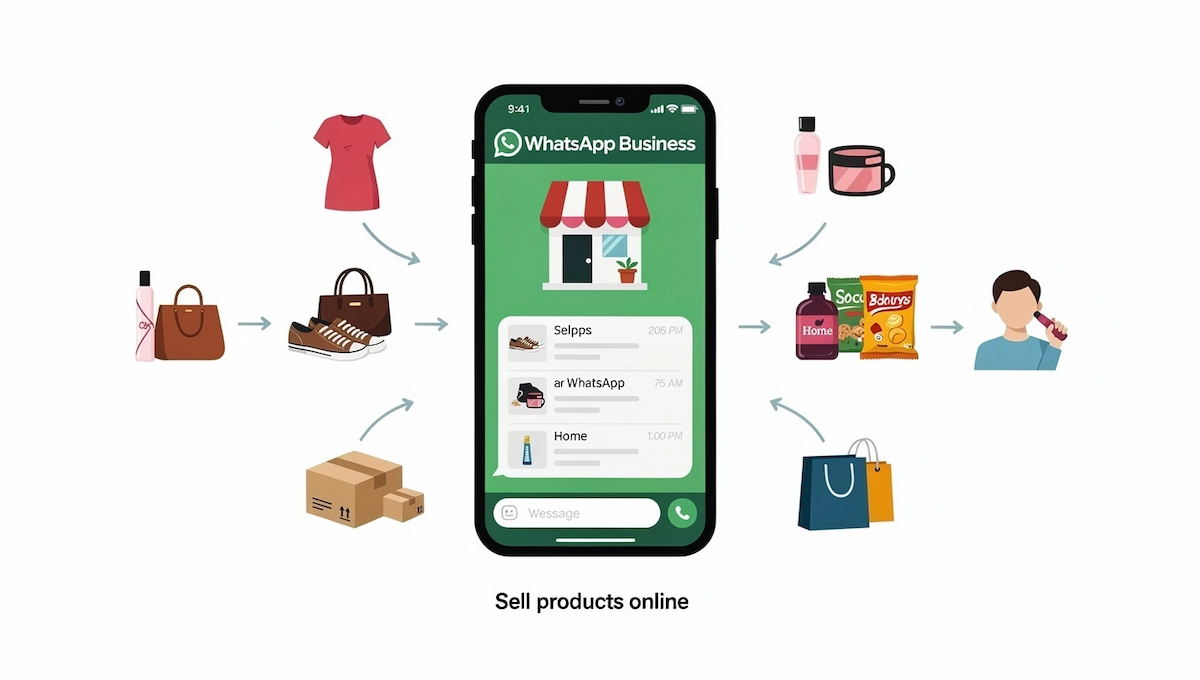
Sell clothes, shoes, bags, beauty items, snacks or home goods straight from your WhatsApp catalog. Post new items in the status, answer questions on WhatsApp and confirm orders in one message. This is the simplest model and fits both local sellers and small brands.
2. Dropshipping
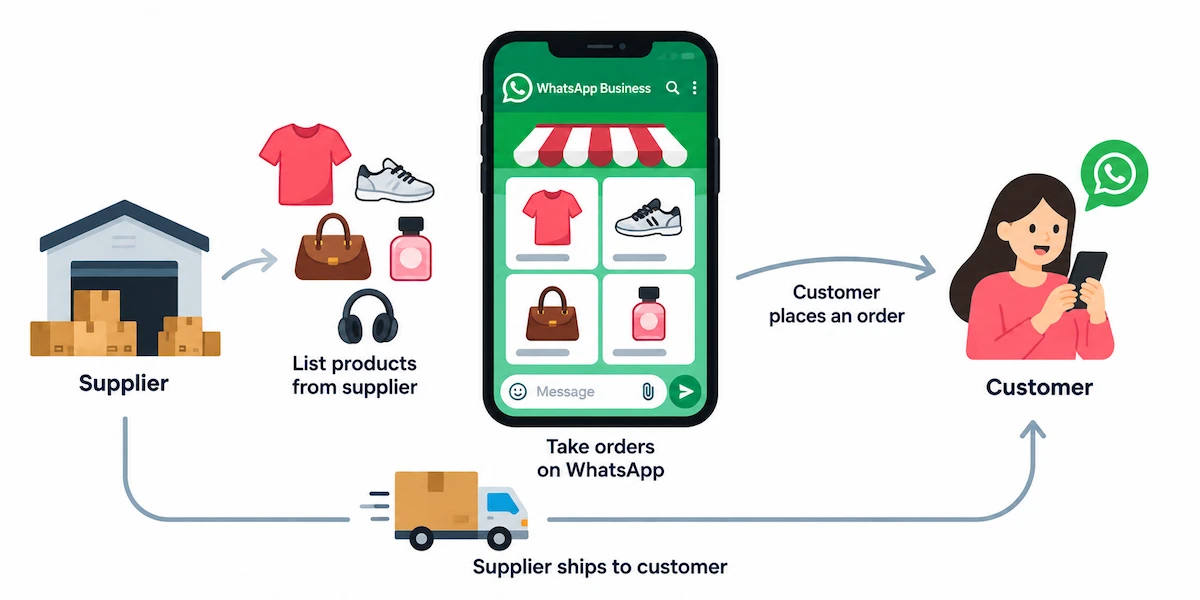
In dropshipping, you list products from a supplier, take the order on WhatsApp and the supplier ships to the customer, so you hold no stock. You earn the difference between your price and the supplier price. The section on dropshipping below explains the steps.
3. Reselling and group selling
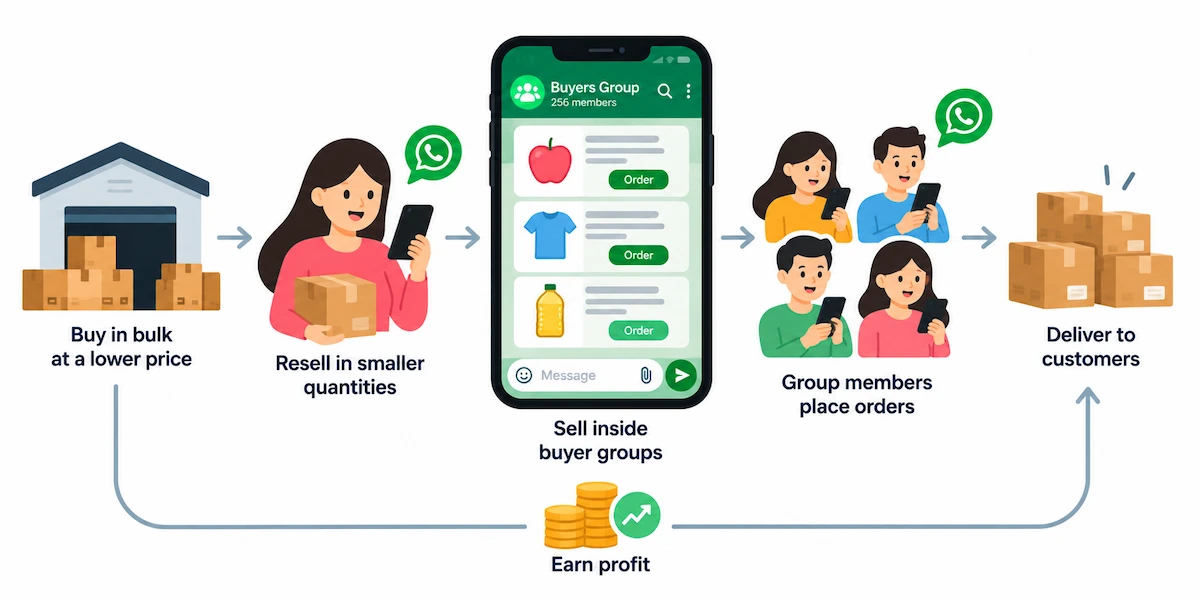
Buy products in bulk at a lower price and resell them in smaller quantities to your contacts, or sell inside buyer groups where members share orders. Group selling works well for food, fashion and household items that people buy often.
4. Digital products
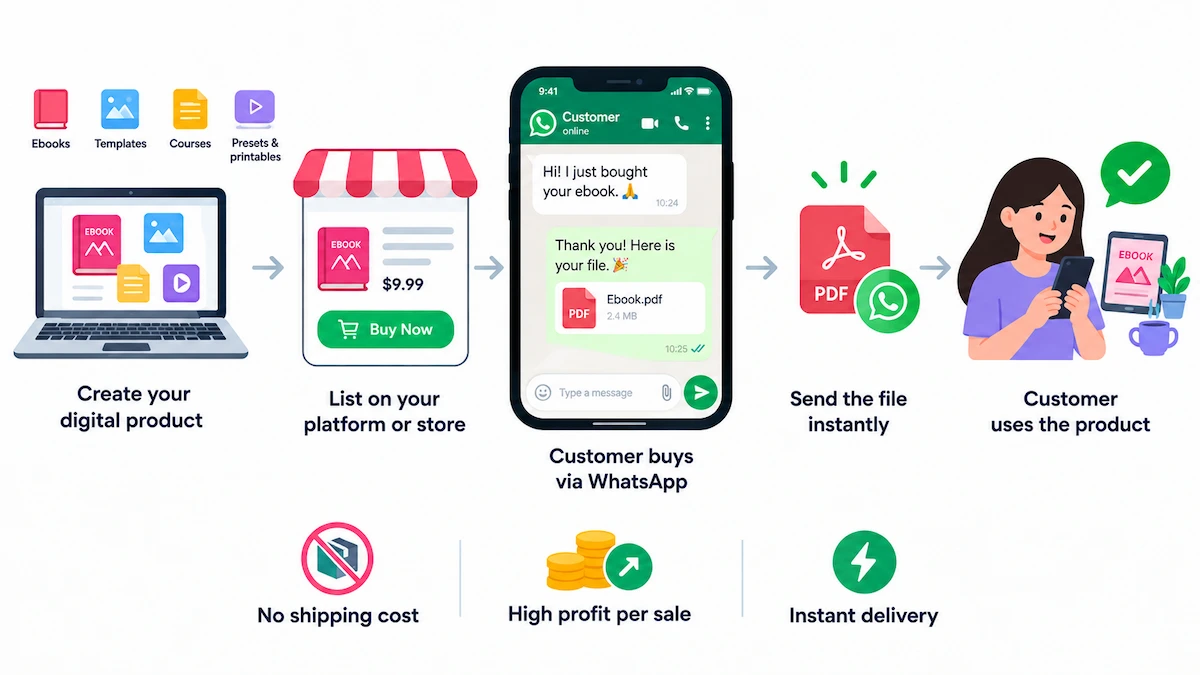
Sell ebooks, templates, courses, presets or printable files. Delivery is instant: you send the file on WhatsApp after payment. Digital products have no shipping cost, so the profit per sale on WhatsApp is high.
5. Coaching and consulting
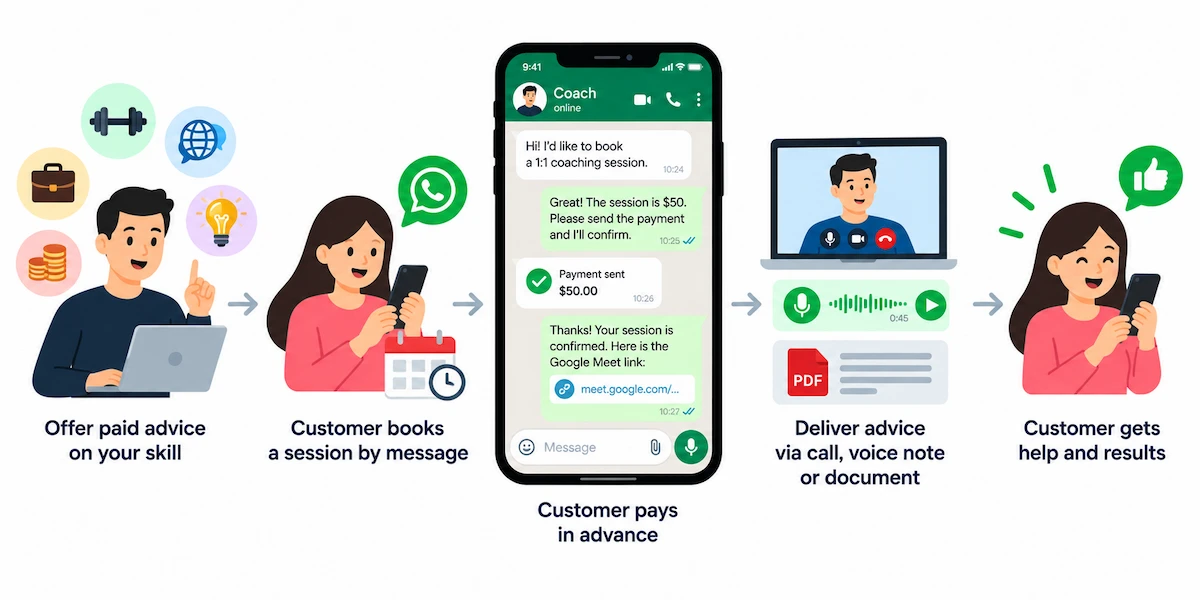
Offer paid advice on fitness, language, career, money or any skill you know well. Customers book a session by message, pay in advance and receive voice notes, documents or a video call link on WhatsApp.
6. Paid WhatsApp groups and communities
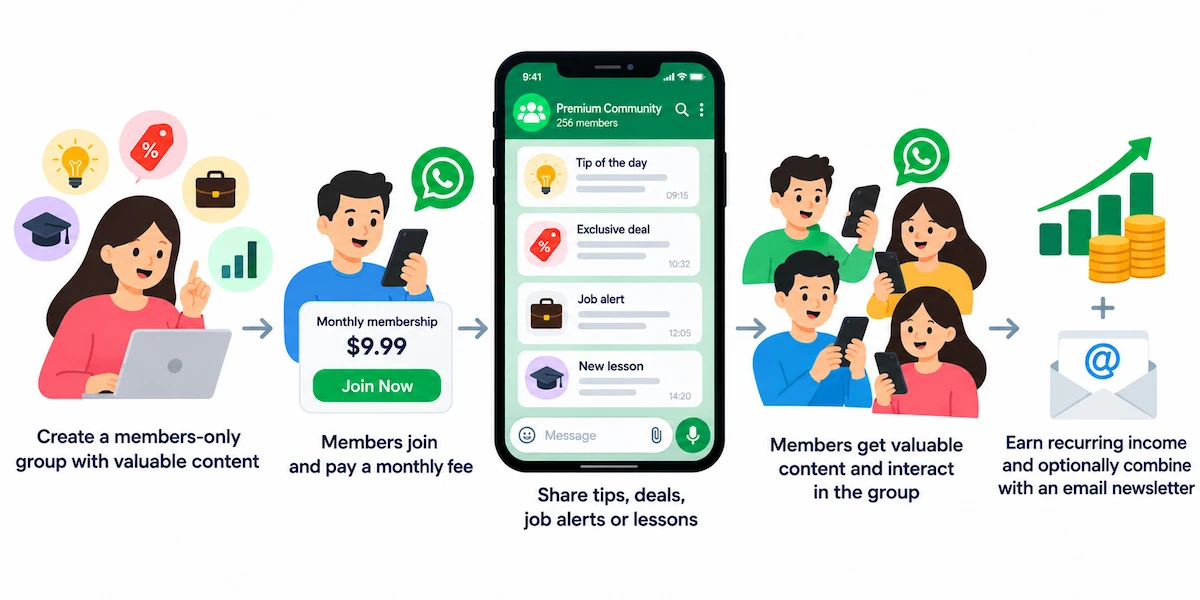
Run a members-only WhatsApp group with tips, deals, job alerts or lessons, and charge a monthly fee. Success depends on steady, useful posts and a clear promise of what members get. Some creators combine a paid group with an email newsletter.
7. Affiliate marketing
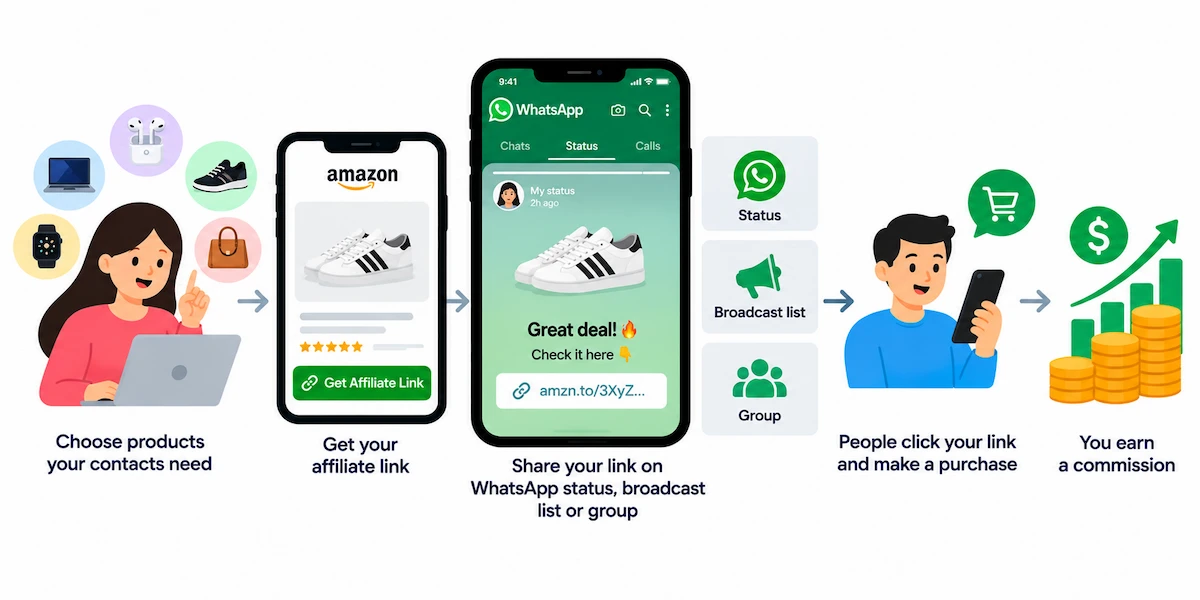
Share product links through your WhatsApp status, broadcast list or group, and earn a commission on each sale made through your link. Choose products your contacts really need, and tell them the link is an affiliate link so they trust the recommendation.
8. WhatsApp marketing services for other businesses
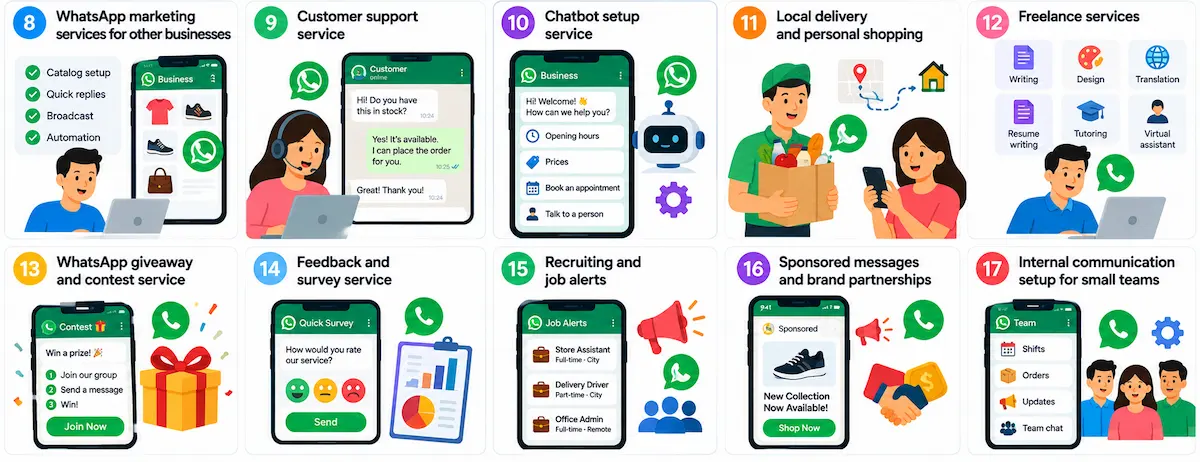
Many small shops do not know how to set up a WhatsApp catalog, write quick replies or run a broadcast. You can do it for them for a monthly fee, which makes this a strong service business with low costs and steady clients.
9. Customer support service
Take over the WhatsApp chats of a small company, answer questions, confirm orders and pass the hard cases to the owner. Businesses pay for fast replies, and an agent who works the WhatsApp chat in set hours is easier to hire than a full-time employee.
10. Chatbot setup service
Build simple WhatsApp auto-reply flows for small businesses, such as a menu with opening hours, prices and booking options. Chatbots take work off the owner, and a one-time setup fee plus a monthly maintenance fee makes a steady income.
11. Local delivery and personal shopping
Take orders by chat for groceries, errands or gifts, buy the items and deliver them. This model suits people who live in a busy area and know the local shops well.
12. Freelance services
Offer writing, design, translation, resume writing, tutoring or virtual assistant work. Clients send the brief on WhatsApp, you send samples and drafts and take payment before the final delivery. When you are ready to turn this into a bigger company, an online business manager can run the daily work while you focus on sales.
13. WhatsApp giveaway and contest service
Help local brands run giveaways in the status or in a group: collect entries, pick winners and send prizes. Contests must follow the local rules, so write clear terms and keep consent records for every entrant.
14. Feedback and survey service
Collect reviews and short survey answers for small businesses through chat. Customers answer faster in a chat than in an email form, and the business pays for a clear report on what buyers like and dislike.
15. Recruiting and job alerts
Run a group or a broadcast list that shares verified job openings in one city or one field, and earn from employers who pay to post or from referral fees. Quality matters here, so check every offer before you share it.
16. Sponsored messages and brand partnerships
Once you have an engaged audience in a group or a broadcast list, local brands may pay to appear in it. Keep sponsored posts rare and labeled, because too many ads make members leave.
17. Internal communication setup for small teams
Set up WhatsApp groups, rules and simple routines so a small company can share shifts, orders and updates without messy chats. You can charge a setup fee and a monthly fee for support and training.
WhatsApp features that help you sell
The WhatsApp Business app has several tools for sellers. The table lists the ones that matter most.
| Feature | What it does | How a seller uses it |
|---|---|---|
| Business profile | Shows name, hours, address and description | Builds trust before the first message |
| Catalog and collections | Lists products with photos and prices | Replaces a price list and a shop page |
| Catalog links | Shares a product link on WhatsApp | Sends a customer straight to one item |
| Quick replies | Saves short answers with a shortcut | Answers common questions in seconds |
| Greeting and away messages | Sends automatic messages | Welcomes new customers and covers off-hours |
| Labels | Tags chats by status | Marks new customer, payment pending, order complete |
| Broadcast lists | Sends one message to many contacts | Announces offers to customers who saved your number |
| Status | Shares photos and short posts for 24 hours | Shows new stock and flash sales |
Broadcast lists have a limit on the number of recipients, which was 256 contacts at the time of writing, and people receive the message only if they have saved your number. Check the current limits in the WhatsApp Business app before you plan a campaign.
Interactive messages, cart and statistics
Several features make selling in chat easier. Interactive messages, such as buttons and lists, let customers tap an answer instead of typing, for example to confirm an order or choose a delivery option. The cart feature lets a customer pick several items from the catalog and send them to you in one message. Message statistics show how many messages were sent, delivered and read, which helps you check if a broadcast is reaching people. Features differ by country and app version, so check what is available on your phone.
WhatsApp Status and Channels for selling
The WhatsApp status is one of the cheapest ways to show products to your customers. A status post stays visible for 24 hours and appears at the top of the WhatsApp chat list for every contact who saved your number. Many sellers post new items in the morning, a flash sale at noon and customer photos in the evening, so WhatsApp users see something fresh every time they open the app.
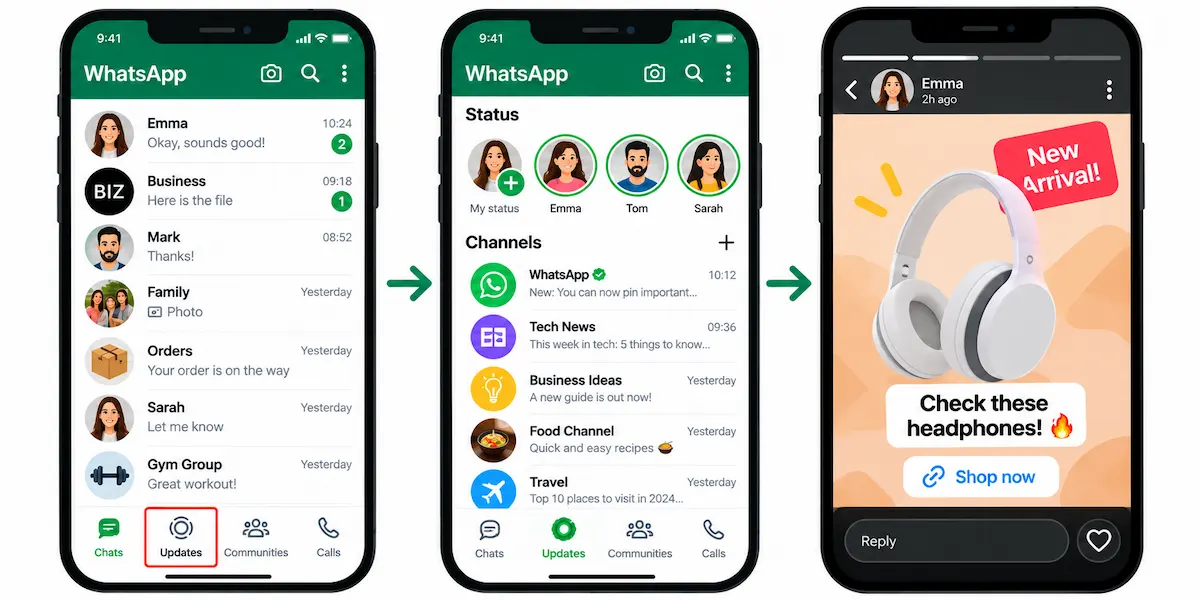
Good status posts are short and clear. Use a sharp photo, a price and a simple call to action such as “message me to order”. Add the catalog link when you want customers to browse more. Avoid posting more than a handful of times a day, because too many updates make customers mute your status.
WhatsApp Channels work differently: they are one-way broadcast feeds that anyone can follow without sharing a phone number. A channel suits creators and brands that want to share tips, news or offers with a large audience, while the business chat remains the place where customers ask questions and place orders. Treat the channel as a place to attract followers and the business chat as the place to turn them into buyers.
How to earn from WhatsApp status
The status can bring sales and income in several ways. Run flash sales with a deadline, post customer photos and short testimonials, share short product demo clips and add affiliate links with a clear label. Creators with a large audience can also sell shoutouts to other brands. Keep posts regular, add the price and a call to action, and measure which posts bring the most replies.
How to accept payments on WhatsApp
Payment options on WhatsApp depend on the country. In some markets, WhatsApp has a built-in payment feature, but in most places the payment happens outside the WhatsApp chat.
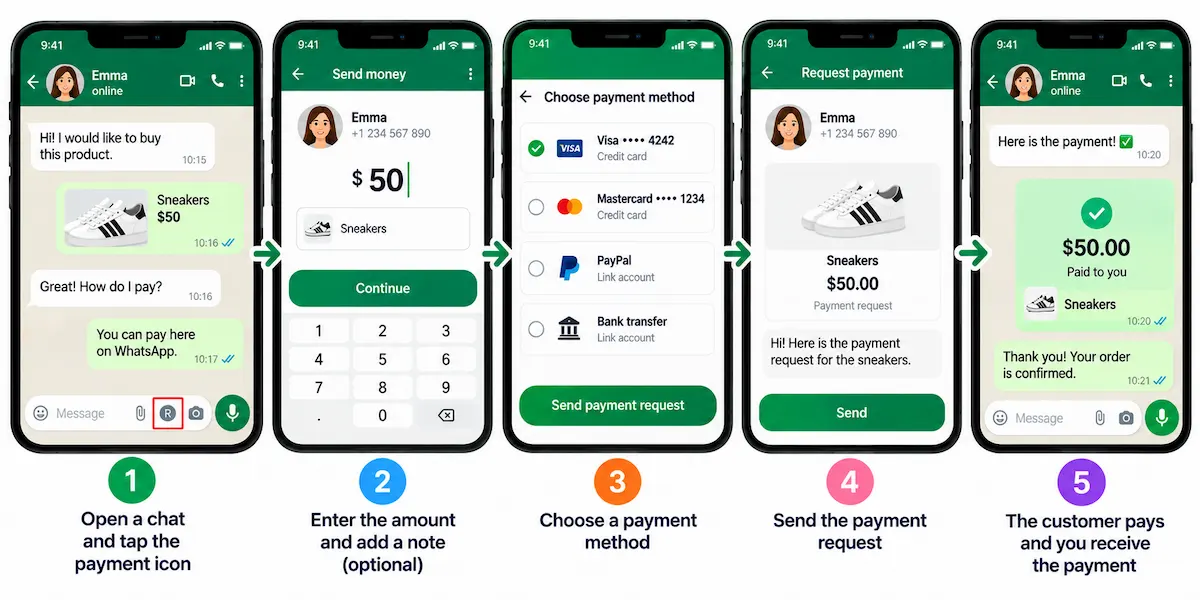
The common methods are:
- Bank transfer: send the account details on WhatsApp and wait for a screenshot or a notification from the bank.
- Mobile wallets and payment apps: popular in many regions, they let the customer pay in seconds from a phone.
- Payment links: create a link with a payment provider and send it on WhatsApp, so the customer pays by card without leaving the phone.
- Cash on delivery: the customer pays the courier on arrival, which builds trust with new buyers but adds the risk of refused parcels.
Always confirm that the money has arrived before you ship. Keep a record of each payment with the order number, and never share your full card details or one-time codes on WhatsApp. A clear refund and return rule, written in the catalog description, prevents most disputes.
How to find your first customers
The first WhatsApp customers almost always come from people who already know you. After that, you need ways to reach strangers. These are the most common methods:
- Contact list: message your existing contacts with a short introduction and the catalog link. Do not add people to groups without asking.
- Status updates: post new products, prices and customer photos daily. The status disappears after 24 hours, so fresh posts keep customers looking.
- Buyer and seller groups: join local groups where selling is allowed and follow the rules of each group.
- Click-to-chat links and QR codes: create a wa.me link or a QR code that opens a WhatsApp chat with your business, and put it on your website, flyers, packaging and social media bios.
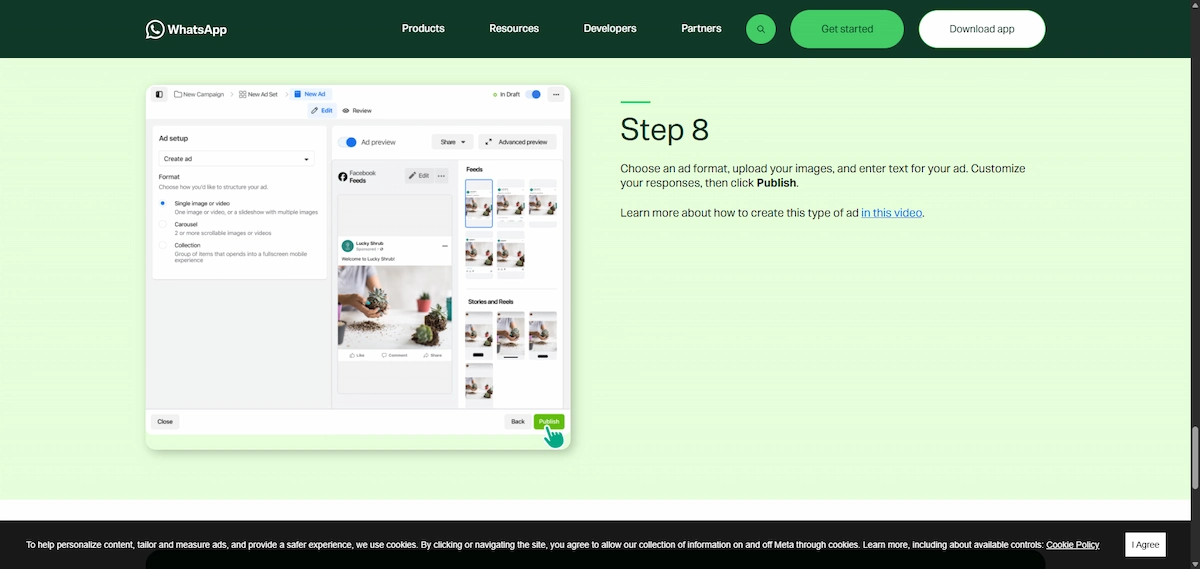
- Click-to-WhatsApp ads: run ads on Facebook or Instagram that open a WhatsApp chat with your business when clicked. This costs money, so test with a small budget first.
- Referrals: ask happy customers to share your link, and give a small discount to both sides when a referral turns into a sale.
Track how much you spend to win each customer, because paid methods only make sense if each new buyer brings back more than they cost. The guide on customer acquisition cost explains how to calculate it.
Incentives and giveaways to invite customers
People respond when they get something for starting a conversation. Offer a discount code for the first order, a free sample, a small giveaway for sharing your status or a free checklist or ebook for new contacts. Always ask for consent before adding anyone to a list, and follow local rules for contests and prizes.
Customer labels and segmentation
Labels turn a long chat list into a simple customer database. Common labels are new customer, repeat customer, payment pending, order complete and VIP. Use them to send the right message to the right group: a reminder to payment pending, a thank you to order complete and an early offer to VIP customers. Short, personal messages that use the name of the customer work better than the same text sent to everyone.
Loyalty, win-back and repeat sales
Repeat customers cost less than new ones. Send a thank you note after each order, give a loyalty code after a set number of purchases and reward referrals with a small discount for both sides. For customers who have not ordered for a while and agreed to receive messages, a friendly win-back message with a short offer often brings them back.
Connect WhatsApp to your website or online store
You can start without a website, but linking WhatsApp to one makes the business easier to grow. Add a click-to-chat button or a wa.me link to your site, your social profiles and your email signature, so visitors can ask a question in one tap. Add a WhatsApp share button to product pages, so customers can send an item to a friend.
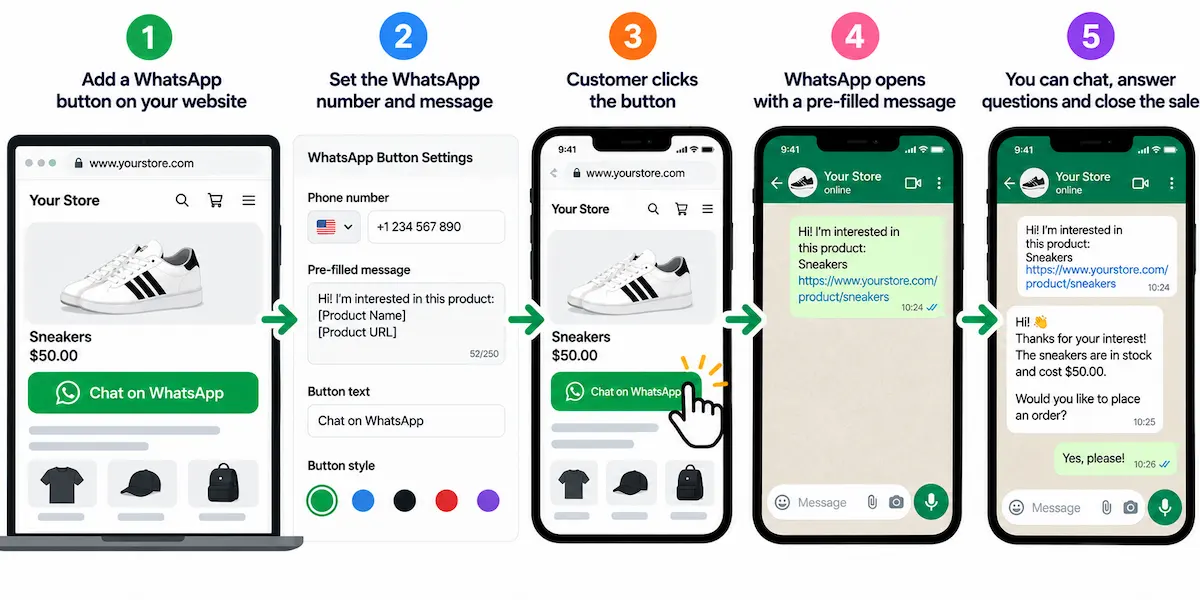
In some markets, the business catalog can be linked to a Facebook or Instagram shop, and several store platforms have plugins that send order updates by WhatsApp. When a customer is ready to pay, you can also send the store link in the chat for a normal checkout. If you plan to build a full site later, the guide on how to start a digital business explains the next steps.
Examples of online businesses on WhatsApp
The examples below are simple scenarios that show how the steps fit together. They are illustrations, not case studies of real companies.
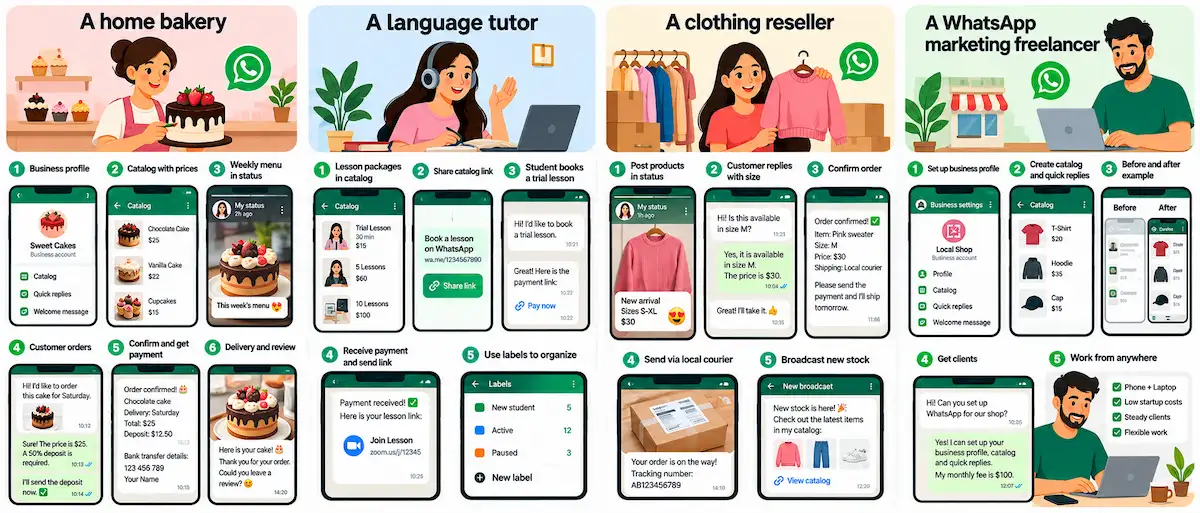
A home bakery
A baker sets up the WhatsApp Business app with a separate number, adds the cakes to the catalog with prices and posts the weekly menu in the WhatsApp status. Customers message to order, the baker confirms the date and price with a quick reply and asks for a deposit by bank transfer. On the day of delivery, the baker sends a photo of the finished cake and asks for a review.
A language tutor
A tutor lists lesson packages in the catalog and shares the link with friends and in local groups. Students book a trial lesson by message, pay in advance with a payment link and receive the video call link in the same WhatsApp chat. Labels mark students as new, active or paused, so the tutor always knows who to follow up with.
A clothing reseller
A reseller buys stock in bulk, photographs each item and posts the pictures in the status. Customers reply to the post with their size, the reseller confirms the price and the order on WhatsApp and the item goes out with a local courier after payment. A broadcast list tells customers who saved the number when new stock arrives.
A WhatsApp marketing freelancer
A freelancer helps small shops set up the business profile, catalog and quick replies for a monthly fee. The first client comes from a friend, the second from a referral and the third from a status post showing a before and after of a client catalog. Because the freelancer works from a phone and a laptop, startup costs stay close to zero.
Automation and chatbots
Automation saves time when the number of WhatsApp chats grows. The WhatsApp Business app already has basic automation: the greeting message, the away message and quick replies. Together they cover the first reply, the after-hours reply and the answers to common questions.
A chatbot goes a step further. It can show a menu, answer questions about prices and opening hours, collect order details and pass the WhatsApp chat to a human when a customer needs help. Good bots stay short and simple, and always offer a way to reach a real person.
When to move to the WhatsApp Business API
Move to the WhatsApp Business API when you outgrow one phone: for example, when more than one person has to answer WhatsApp chats, when you send order updates in bulk or when you want a bot to handle most routine questions.
The API is reached through a Business Solution Provider and usually costs a monthly fee plus a charge per message. It also needs message templates approved by WhatsApp before you can start a conversation with a customer.
Do not move too early. A seller with ten to thirty chats a day usually does well with the free app, quick replies and labels.
Order updates, reminders and follow-up
Updates keep customers calm and cut down on questions. Send an order confirmation, a shipping message with tracking details and a short note when the parcel is out for delivery. For cash on delivery, a confirmation message before dispatch reduces refused parcels. If a customer asked about an item and did not pay, one polite reminder is fine, but do not send more than one. At higher volume, the Business Platform and automation tools can send these messages for you.
Dropshipping on WhatsApp step by step
Dropshipping on WhatsApp lets you sell without holding stock, and the process fits the WhatsApp Business app well. The seven steps below show the full process.
- Find reliable suppliers: look for suppliers that ship fast, accept small orders and offer cash on delivery or tracked shipping in your market. Order a sample before you sell anything.
- List the products: take or request clear photos and write simple descriptions and prices in your catalog.
- Set up the business profile and catalog: use the steps from the section above.
- Promote: use status posts, groups, click-to-chat links and ads.
- Take orders: confirm the item, price, address and payment method in writing.
- Pass the order to the supplier: send the customer details and pay the supplier price.
- Follow up: share the tracking details, check that the parcel arrived and ask for a review.
The main risk is that you do not control stock or shipping, so late or damaged parcels become your problem. Choose suppliers with a good record, state delivery times clearly and keep a simple return policy.
Pros and cons of running an online business on WhatsApp
| Pros | Cons |
|---|---|
| Free app and low startup cost | No built-in checkout in most countries |
| Direct, personal contact with customers | Manual order processing takes time as volume grows |
| High message open rates and fast replies | Limited analytics compared with a website |
| Easy sharing of photos, voice notes and files | Risk of account suspension if you break the rules |
| Catalog, quick replies and labels included | Customers may expect answers at any hour |
| No website needed to start | Can look less professional than a full online store |
For many sellers, the best plan is to start on WhatsApp and add a website once sales are steady. The difference between a WhatsApp-based shop and a full store is explained in this guide on online business vs ecommerce.
Limitations of running a business on WhatsApp
WhatsApp works well for a start, but it has limits that sellers should know before they build a business on it.
- No full checkout: in most countries, orders and payments are handled by hand, which takes time as volume grows.
- Limited analytics: the app shows basic message statistics, not the detailed reports of a website or an advertising tool.
- Limited agents and devices: the free app supports only a small number of linked devices, so a growing team needs the Business Platform.
- Consent rules: you can message only people who agreed to hear from you.
- Risk of suspension: reports and spam complaints can lead to a blocked number.
- Dependence on one platform: if the account is blocked, you can lose access to your customers.
- Support load: customers expect quick answers at any hour, which can stretch a one-person business.
Rules, consent and legal basics
WhatsApp has rules for businesses, and breaking them can lead to a blocked WhatsApp account. Follow these basics:
- Get consent first: message only people who gave you their number and agreed to hear from you. This is called an opt-in. Keep a record of how and when each person agreed.
- Offer an opt-out: tell people how to stop receiving messages, and respect the request at once.
- Do not send spam: avoid mass messages to people who did not ask for them, and do not add people to groups without asking.
- Publish a privacy policy: state what customer data you keep and why, especially if you collect names, addresses and phone numbers.
- Sell only allowed items: WhatsApp bans some products and services. Read the official commerce policy before you list anything unusual.
- Follow local law: register the business if your country requires it, keep records of sales and pay the taxes that apply to you.
Rules on messaging and data differ by country, so check the local requirements and, if needed, ask an accountant or a lawyer. A short check before you start costs far less than a banned number with all your customers on it.
WhatsApp business checklist for your first week
- Install the WhatsApp Business app and register a number used only for the business.
- Fill in the business profile: name, picture, description, hours, address and links.
- Add at least ten products to the catalog with clear photos and prices.
- Write the greeting message, the away message and five quick replies.
- Create labels for new customers, payment pending and orders complete.
- Post the catalog link in your WhatsApp status and send it to your closest contacts.
- Choose one payment method and write the instructions as a quick reply.
- Take the first orders, confirm each one in writing and arrange delivery.
- Ask each customer for feedback and a referral after the order arrives.
- Review the week: how many chats, how many orders and which posts worked best.
Common mistakes to avoid
- Using a personal number: customer WhatsApp chats mix with private ones, and you cannot pass the business to someone else later.
- Messaging without consent: bulk messages to strangers lead to blocks and reports, which can end in a suspended account.
- Slow replies: WhatsApp customers expect fast answers. Use quick replies and away messages to cover busy periods.
- Old catalog prices: customers who see one price and pay another stop trusting the business.
- No written order confirmation: without a clear message, disputes about price, color or delivery date are hard to settle.
- Shipping before payment: always confirm that the money arrived, unless you use cash on delivery.
- Relying on one channel only: if the account is blocked, you lose everything. Keep a backup of your customer list and add a second channel, such as a website or social page.
- Doing everything alone for too long: when chats pile up, hire help or use automation before response times slip.
Troubleshooting common problems
- Verification code does not arrive: check the signal and the number format, wait a few minutes and ask for the code by phone call.
- Messages are not delivered: check your internet connection, update the app and see if the customer blocked the number or changed it.
- Catalog does not show: make sure you use the business app, update it and check that each item has a photo, a name and a price.
- Number is banned: review the business and commerce rules, contact support from the app and avoid creating new numbers to get around the block.
- Customers do not reply: shorten the message, ask one clear question, add buttons and send at a better time of day.
- Chats are lost: turn on chat backup and keep a separate list of customers and orders in a spreadsheet.
Tools that help you run your business
You can start with the WhatsApp Business app alone, but a few simple tools save time as you grow. Look for these types:
- Catalog and product tools: keep product photos and prices in one spreadsheet, so you can update the catalog quickly.
- CRM and contact tools: store customer names, orders and notes in one place, so you do not rely on chat history.
- Automation and chatbot tools: connect to the business platform and handle menus, order updates and reminders.
- Payment tools: create payment links and receive money from cards, wallets or bank transfers.
- Design tools: make clean product photos and status images with free design apps.
Choose tools that fit your size. A seller with a small customer list does not need paid software on day one, and a spreadsheet plus labels in the WhatsApp Business app is enough. The guide on how to run an online business gives more tips on setting up the daily work.
How to measure your results
Track a few numbers each week so you know what works on WhatsApp. Useful ones are:
- New chats: how many people message the business each week.
- Response time: how long it takes to answer the first message.
- Conversion rate: the share of WhatsApp chats that turn into paid orders.
- Average order value: how much a customer spends per order.
- Repeat customers: how many buyers come back for a second order.
- Status views and replies: which posts bring the most messages.
Write the numbers in a spreadsheet and review them every month. If the conversion rate is low, check your prices, replies and payment steps. If response time is slow, add quick replies or hire help.
How much does it cost to start?
An online business on WhatsApp can start with very little money, because WhatsApp itself costs nothing. The app is free, and the main costs are the stock or supplier price, packaging, delivery and a payment fee if you use a provider. A seller who buys a few items in bulk and photographs them with a phone can start for a small amount.
Add a budget for ads only after your first sales, and for software when the volume grows. Founders who want to keep costs near zero can read how to start an online business with no money, which shows ways to start by selling a service first. Many of the steps in this guide, from the free app to dropshipping, follow the same low-cost approach.
The future of WhatsApp for business
Chat commerce is likely to keep growing. Many countries are adding in-chat payments, more ads open a chat directly, and automatic assistants now handle the first reply for many companies. Sellers who build a customer list, write clear replies and keep good records now will find it easier to add these tools later. The basics will stay the same: fast answers, honest prices and good service.
FAQ
Can I run an online business using WhatsApp?
Yes. You can run an online business using WhatsApp by setting up the WhatsApp Business app, adding a catalog, answering customers on WhatsApp, taking orders and collecting payment. It works best for small sellers and service providers, and you can add a website later.
Is WhatsApp Business free to use?
The WhatsApp Business app is free to download and use. The Business Platform, which is the version for larger companies, charges for messages through a provider. Costs such as ads, payment fees and delivery are separate.
What is the difference between WhatsApp and WhatsApp Business?
WhatsApp is the personal app for chatting with friends. WhatsApp Business is a separate app with a business profile, a catalog, quick replies, labels, away messages and broadcast lists, which are all built for selling and customer service.
Can I use my personal number for my business?
You can, but it is better to use a separate number. A separate number keeps customer WhatsApp chats apart from private ones and makes it easier to hand the business to someone else later. You can also run the business app and the personal app on the same phone with different numbers.
Can I sell products on WhatsApp without a website?
Yes. You can show products in the WhatsApp catalog, take orders on WhatsApp and collect payment by bank transfer, wallet, payment link or cash on delivery. Many small sellers run a full business on WhatsApp this way before they build a website.
How do I accept payments on WhatsApp?
In most countries, payment happens outside the WhatsApp chat. Send the bank details or a payment link in the conversation and wait for the money to arrive before you ship. Some markets have a built-in payment feature, so check what is available where you live.
Can I use WhatsApp for dropshipping?
Yes. List the supplier products in your catalog, take orders on WhatsApp and pass the order and the customer details to the supplier. Choose suppliers that ship fast and track parcels, because you are the one customers will contact if something goes wrong.
How do I promote my business on WhatsApp?
Start with your WhatsApp contacts and your status, join local buyer groups, share your catalog link and a QR code, and ask happy customers for referrals. When sales are steady, test click-to-WhatsApp ads on Facebook or Instagram with a small budget.
Can multiple people use one WhatsApp Business account?
The app can be linked to several devices, so more than one person can read and answer WhatsApp chats. If you need many agents, shared inboxes and routing, the Business Platform through a provider is the better choice.
Is it safe to collect payments via WhatsApp?
Using WhatsApp for payments is safe if you use trusted payment methods, confirm every payment before shipping and never share card numbers or one-time codes on WhatsApp. Use payment links from a known provider and keep a record of each transaction.
How can I automate replies to customers?
Use the greeting message, away message and quick replies in the WhatsApp Business app for the basics. For more advanced automation, use a chatbot through the Business Platform, which can show menus, answer common questions and pass the WhatsApp chat to a person.
Is it legal to make money on WhatsApp?
Yes, as long as you follow the WhatsApp business and commerce policies, get consent before messaging customers, sell only allowed products and meet the tax and registration rules of your country. Check the local rules or ask an accountant if you are unsure.
Can I use a landline number for WhatsApp Business?
The WhatsApp Business app can be registered with a landline number, and the verification code can be sent by phone call. Availability can depend on the country and the app version, so check during sign-up.
How long does business verification take?
Verifying a phone number takes minutes. The verified badge is a separate review by WhatsApp and does not have a fixed timeline, so check the current process in the official documentation.
What is the use of WhatsApp Business?
WhatsApp Business helps companies talk to customers, show products in a catalog, answer common questions fast with quick replies, organize chats with labels and send updates. Small sellers use it to run a whole business from a phone.
Which WhatsApp app is best for business?
The WhatsApp Business app is the best choice for most small sellers because it is free and built for selling. Larger companies with many agents and high volume use the Business Platform through a provider.
Can I use WhatsApp Business on multiple devices?
The business account can be linked to more than one device, so you can answer chats from a phone and a computer. The number of linked devices has limits, so teams that need many agents should move to the Business Platform.
What can I sell on WhatsApp?
You can sell physical products, digital files, services such as tutoring or design, and memberships in paid groups. Some products and services are banned, so read the commerce policy before you list anything unusual.
Do I need the WhatsApp Business app to make money?
No, you can sell through a personal account, but it is not recommended. The business app gives you a profile, a catalog, quick replies and labels, which make the business look professional and save time.
How do I get more views on my WhatsApp status?
Post regularly, ask customers to save your number and share useful or fresh content, such as new stock, short product videos and customer photos. Keep each post short and clear, and avoid posting too many updates in one day.
What are the benefits of WhatsApp for an online business?
The main benefits are low cost, direct contact with customers, fast replies, easy sharing of photos and videos and support in the same chat. A seller can start without a website and add one later.